The hYYa Digital Footprint Check detective, a blue furry detective in a deerstalker hat studying a glowing digital footprint through a red magnifier Privacy explained

What is device fingerprinting, and how to check your phone

Device fingerprinting means recognising a device from details it gives away, instead of from an ID it was given. Any app on your phone can read dozens of these details without asking: when it last restarted, to the second; your free space, to the byte; your headphones’ name; your languages. One alone says little. Together they can single out your device and link what you do across apps.

You can check yours for free. hYYa Digital Footprint Check reads exactly what any app can read, explains each detail in plain words, and walks you through fixing what can be fixed — or tells you honestly when only Apple, Google or your device’s maker can.

Last checked:

  • iPhone
  • iPad
  • Mac
  • Android

Requires iOS or iPadOS 26 or later, or macOS 26 or later on a Mac with Apple silicon.

No hYYa account Data Not Collected Open source

What any app can read without asking

No permission, no pop-up. Apps need many of these details to work properly — to lay out the screen, pick your language or route sound to your headphones — so the system hands them over. Here are eight, in hYYa Digital Footprint Check’s words.

When your iPhone was set up, to the second

“The exact second this device was set up or last erased. Hardly any other device shares it, and it stays the same for years.”

Only Apple can fix this. Erasing the device resets it, but that’s not a real fix.

When it last restarted, to the second

“Few devices share it, so it can link you across apps until you restart.”

What helps: restart once a week.

Free space, to the byte

“It changes slowly, so two apps that read the same number at about the same time can tell they’re on the same device.”

Only Apple or Google can fix this. No setting rounds it off.

Your headphones’ name

“Headphones are often named after their owner, such as ‘Sam’s AirPods’, which hands over a first name.”

What helps: rename them to something generic, such as “Headphones”.

Your languages and keyboards

“Your languages, in order. An unusual mix is rare and can hint at where you’re from.”

What helps: remove languages and keyboards you don’t use.

A note that survives deleting an app

“Delete the app and install it again, and it knows you’re back.” On iPhone it can even count how many times you’ve reinstalled.

Only Apple or Google can fix this; only erasing the whole device clears it.

Your exact model, screen and sensors

Together they point to your model. On Android, “tiny factory differences in sensors can single out one device.”

These come with the hardware. There’s nothing to change.

Which apps you have

Any app can ask whether specific apps are installed, one by one — an answer that could reveal your dating life, your health, your faith or your money.

What helps: the app’s Sensitive apps check shows which of yours can be spotted.

A Mac lets any app read even more, including its serial number and hardware ID, which stay the same even after you erase it, and the full name on your account. What the app shows on a Mac.

How harmless details add up to a fingerprint

Rare together

Your phone’s model and system version are shared by millions. Add your languages, your free space and the second it last restarted, and very few devices match all of them at once.

The same in every app

Every app reads the same values. Two apps that see the same free space and the same restart time at about the same moment can tell they’re on the same device — no shared ID needed, and nothing for you to refuse.

Some details last

Each detail lasts for a different time: until you restart, until you change a setting, until you erase the device, or for as long as you own it, because it comes with the hardware. The longer a detail lasts, the longer it can recognise you.

That is why a fingerprint is different from an advertising code. On iPhone, turning off tracking requests stops apps getting the shared advertising code that follows you between them. A fingerprint doesn’t need that code.

Websites can do it too

“Many apps open web pages inside themselves. Those pages can read your languages, screen, time zone and graphics, and draw hidden images whose tiny differences tell devices apart.” The app’s advice: open links in your browser, where tracking protection is stronger.

See what any website can read about your device — a free hYYa tool that shows it only on your screen and sends nothing anywhere.

How to check your phone

hYYa Digital Footprint Check is free, on iPhone, iPad, Mac and Android. Nothing it reads leaves your device.

1. Scan what apps can read

Open Footprint and tap once. It checks the details any app can read about your device without asking — nearly 50 on an iPhone or iPad.

You get a score out of 100 — higher is better — and it opens on what you can fix, each fix showing what it is worth in points. The full list is one tap away.

Footprint on iPhone: 2 things you can fix, Restart once a week and Rename your headphones, with a score of 57 out of 100 and See everything apps can read (47)

2. Read what each detail gives away

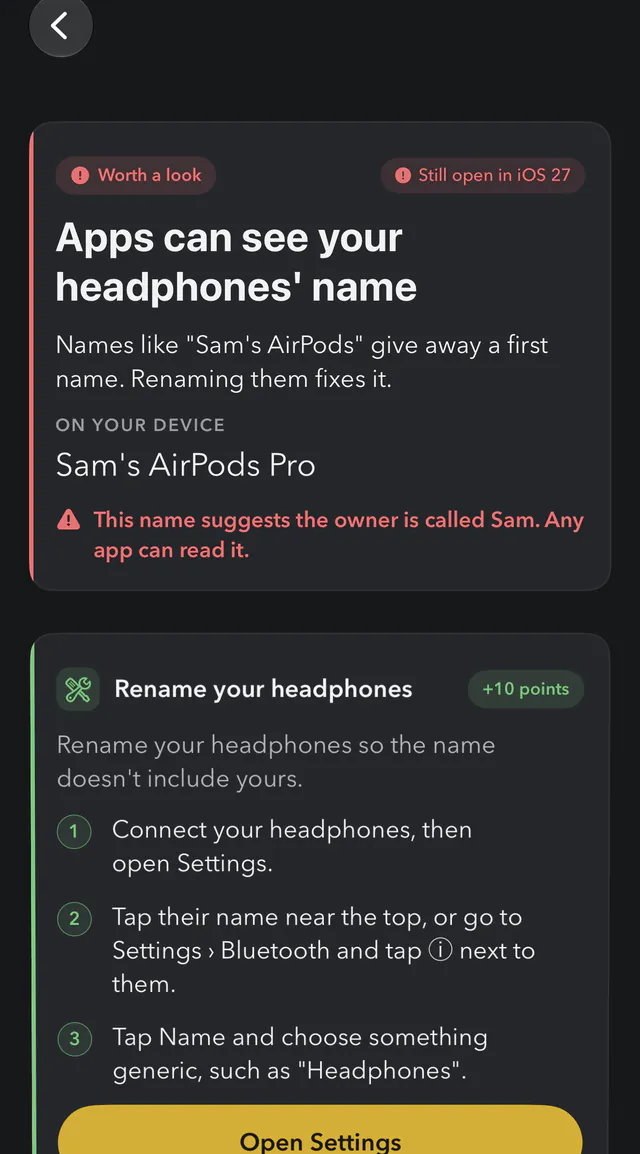
Each finding says how serious it is — worth a look, worth knowing or minor — who can read it, how long it lasts and what it lets someone do, in plain words.

Where you can fix it, the steps are right there, with a button that opens Settings. The app can’t change settings for you: you make each change, then scan again to watch your score go up.

Footprint finding on iPhone: Apps can see your headphones' name, showing the sample name Sam's AirPods Pro and three steps to rename them

3. On Android, the same check

The Android version reads what any Android app can read, from your device’s name to your headphones’ name, and also flags apps that hold powerful access, such as reading your screen or every notification.

“Fix them with me” takes you through each finding you can fix, one at a time. Where only Google or the device maker can fix something, it says so.

Footprint on Android: 4 things you can fix, including Give your device a name without yours and Rename your headphones, with a score of 45 out of 100

What you can change, and what you can’t

You can change

  • Your headphones’ name, and on Android your device’s name, so neither includes yours.
  • Your last restart time: restart once a week.
  • Languages, keyboards, fonts and voices you don’t use: remove them.
  • On iPhone, tracking requests: turn them off so every app is told no automatically.
  • Your system version: keeping up to date puts you in the biggest crowd and gets you the latest privacy fixes.

Only Apple, Google or your device’s maker can change

  • Your exact free space, and when your iPhone was set up.
  • Your exact model, screen, memory and sensors.
  • The note an app can leave that survives deleting it.
  • On a Mac, the serial number and hardware ID.

hYYa Digital Footprint Check marks which is which on every finding, so you spend your time only on what you can change. More steps for your whole phone: the iPhone privacy settings and Android privacy settings check-ups.

Questions, answered

What is device fingerprinting?

Recognising a device from details it gives away, rather than from an ID it was given. Each detail, such as the model, the languages or the free space, is shared by many people. Put together, they can single out one device and link what you do across apps.

Can apps fingerprint my phone without asking?

They can read the details a fingerprint is made of. Any app can read dozens of details about your device without asking — nearly 50 on an iPhone or iPad — such as when it last restarted, your free space to the byte and your headphones’ name.

Can I stop device fingerprinting completely?

No. You can change some details, such as your headphones’ name or your last restart, which makes your device harder to single out. Others, such as your exact free space or the second your iPhone was set up, only Apple, Google or your device’s maker can hide.

Does a VPN stop fingerprinting?

No. A VPN hides your address, but apps can still see that you use one. Your App Store country and your time zone stay the same with a VPN on, and so do the other details on this page.

Does turning off tracking requests on iPhone stop it?

It stops apps getting the shared advertising code that follows you between apps, and every app is told no automatically. It’s worth doing. A fingerprint is built from other details, so it doesn’t need that code.

Does hYYa Digital Footprint Check show which apps fingerprint me?

No. It can’t see what other apps read. It reads exactly what any app could read on your device, explains each detail, and helps you change what can be changed. On iPhone and iPad, its Tracker explains your own App Privacy Report: which apps used your location, photos, contacts, camera or microphone.

Is it a spyware or virus scanner?

No. It shows what any app can read about your device, and how to reduce it. It does not look inside other apps or search for malicious code.

Is it free, and does it send my data anywhere?

It is free, with no ads. Nothing it reads leaves your device: the App Store privacy label is Data Not Collected, Google Play’s data safety section says no data collected, and the Android version has no permission to use the internet.

The app is open source, so you can read every check it makes: hYYa Digital Footprint Check on GitHub.

See what apps can read about your phone

hYYa Digital Footprint Check shows every detail, explains it in plain words, and walks you through fixing what can be fixed.

  • iPhone
  • iPad
  • Mac
  • Android

Requires iOS or iPadOS 26 or later, or macOS 26 or later on a Mac with Apple silicon.

No hYYa account Data Not Collected Open source